
AI Tools for Small Business: Complete 2026 Guide
AI Tools for Small Business: The Complete Guide
If you run a small business, you wear every hat. You write the emails, post the ads, answer the customers, track the money, and book the meetings. AI tools for small business are built to take the repetitive half of that pile off your desk, and they cost far less than hiring help.
The best AI tools for small business are ChatGPT or Claude for everyday writing and planning, Canva for design, Tidio for customer chat, Zapier for automation, and QuickBooks for accounting. Start with one free tool, master it for 30 days, then add a second. Most small teams need only three to five tools to save 10 or more hours a week.

This guide covers what these tools are, which ones are actually worth your money, how much they cost, the mistakes that waste your budget, and a 30-day plan to start safely. No hype. Just what works.
Table of Contents
- What Are They?
- Why Owners Are Using AI Now
- The Best Picks for 2026
- How to Pick the Right Tool
- What They Cost
- Free-Tier Risks
- A 30-Day Start Plan
- Common Mistakes
- Questions Nobody Answers
- Conclusion
- FAQ
What Are AI Tools for Small Business?
An AI tool for a small business is software that uses artificial intelligence (computer systems trained to understand language and patterns) to do a business job for you. It drafts emails, designs flyers, answers customer questions, books appointments, sorts expenses, or moves data between your apps on its own.
Think of it as a junior assistant who never sleeps and costs about $20 a month.
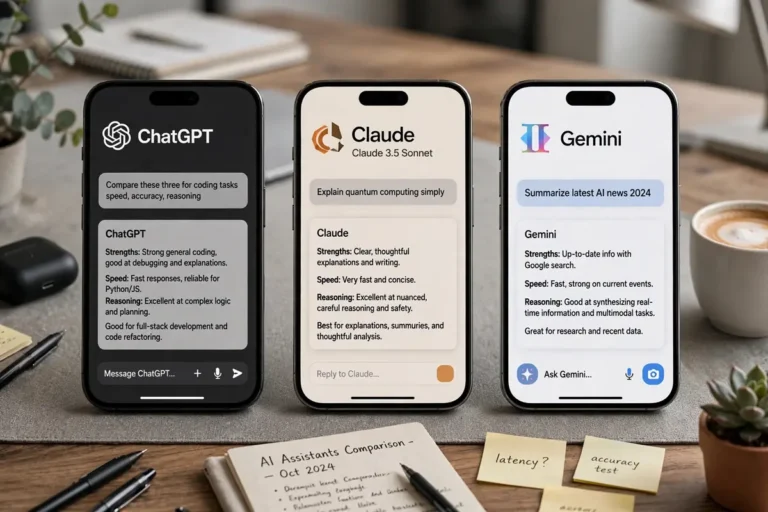
General assistants like ChatGPT and Claude handle many jobs through a chat window. Specialists like Canva (design), QuickBooks (accounting), and Tidio (customer chat) go deep on one job. Most owners start with one general assistant and add one or two specialists later.
Why Small Businesses Are Using AI Right Now
The math works. A tool that costs $20 a month and saves you 10 hours a month pays for itself many times over.
The numbers back this up. According to the Small Business and Entrepreneurship Council's 2026 Tech Use Survey, 82 percent of small business owners have now invested in AI tools, and the typical small business runs about five AI tools across different functions. The U.S. Chamber of Commerce reported in 2025 that AI adoption has moved from experimentation to standard practice in many industries.
The tools got easy: you describe what you want in normal sentences, with no setup. The tools got cheap: free tiers are genuinely useful, and paid plans start around $15 to $20 a month. And the tools connected: AI now sits inside software owners already use, from Google Workspace to Canva to QuickBooks.
The Best AI Tools for Small Business in 2026
Every tool below earns its place by doing one specific job well. Prices are starting prices as of 2026. Check the vendor's live pricing page before you buy, since plans change.
Best All-Round Assistant: ChatGPT
ChatGPT from OpenAI is the most flexible starting point. It drafts emails, writes product descriptions, brainstorms ad ideas, and summarizes reports in one chat window. The free tier covers most everyday needs. ChatGPT Plus costs $20 a month and adds file uploads and custom GPTs (mini assistants you build for repeat jobs). Its weak spot is facts: it can state wrong information confidently, so verify claims by hand for anything touching money or clients.
Best for Long Writing: Claude
Claude from Anthropic is the writer's tool. It holds context across long documents, which makes it strong for proposals, website copy, and contract review. Give it detailed notes on your tone and audience, and it keeps that voice across pages. The free tier is useful; Claude Pro costs $20 a month. Pick Claude when writing quality matters more than speed.
Best for Google Workspace Users: Gemini
If your team lives in Gmail, Docs, Sheets, and Drive, Gemini is the path of least resistance. Google's AI works inside the apps you already use, so there is no new habit to build. The free tier is solid. Gemini Advanced at about $19 a month adds the stronger models and deeper integration. If you live in Microsoft 365 instead, Copilot is the equivalent pick for Word, Excel, Outlook, and Teams.
Best for Marketing Content: Jasper
Jasper is built for teams producing marketing copy across many channels. Its Brand Voice feature learns your style from past content, then applies it to blog posts, ads, and emails. One product description becomes a press release, several social posts, and a landing page. Plans start around $59 a month. It is overkill for occasional posting, and every output still needs a human edit for tone.
Best for Design: Canva
Canva's Magic Studio turns a text description into professional layouts, removes backgrounds, and keeps your brand colors and fonts consistent with Brand Kit. One owner can produce social graphics, flyers, menus, and pitch decks without hiring a designer. The free plan is genuinely useful; Canva Pro costs about $15 a month. Draft your copy first, then check headline length with our free word counter so text fits the layout.
Best for Customer Support: Tidio
Tidio puts a chat widget on your website with an AI assistant that answers routine questions from your own content: shipping times, opening hours, prices. Customers get answers at midnight without you being awake. The free plan covers 50 conversations a month; paid plans start around $29 a month. It fits shops, local services, and restaurants whose customers ask questions before buying.
Best for Automation: Zapier
Zapier connects your apps so repetitive copy-paste work runs itself. A new lead from your form lands in your CRM with a welcome email sent, automatically. Its AI builder turns a plain-English description into a working automation. The free tier covers 100 tasks a month; paid plans start at $19.99 a month. Start with one painful routine you repeat daily, prove it works, then expand.
Best for Accounting: QuickBooks
QuickBooks with Intuit Assist answers financial questions in plain English and handles bookkeeping chores: expense categorization, invoice reminders, and cash flow forecasting. For owners still using spreadsheets, this is often the highest-ROI upgrade of all. Simple Start begins around $38 a month. Map what you actually need before choosing a plan, since the best features sit behind higher tiers.
Best for Meetings: Otter.ai
Otter.ai joins your Zoom, Google Meet, or Teams calls, records, transcribes, and summarizes them, and pulls out action items. After a long session you can ask what deadlines were agreed and get the answer with timestamps. The free plan covers light use; Pro costs $8.33 a month billed yearly. Five or more meetings a week, and the hours it returns pay for itself fast.
Best for Grammar and Tone: Grammarly
Grammarly goes past spell-check into tone, clarity, and impact, and it works everywhere you already write: browser, email, documents. The free tier fixes the basics; Pro costs about $12 a month billed yearly.
How to Pick the Right Tool
Pick one job, then pick the tool for that job. Run this five-point check before subscribing.
- Workflow fit. It must connect to what you already use on day one. If it needs a workaround to talk to your email or accounting software, skip it.
- Pricing model. Flat monthly pricing is predictable. Per-resolution or per-operation pricing sounds cheap until your volume rises and the bill triples.
- Integrations. A tool that does not connect to your Gmail, Shopify, or QuickBooks means paying for Zapier or Make to bridge the gap.
- Data privacy. If you handle customer records or financial data, the contract must block the vendor from training its models on your data. Free consumer plans rarely offer this.
- The 30-day exit test. If a tool does not save you measurable hours within 30 days, cancel before the trial converts. Set a calendar reminder on signup day.
Start with your biggest time sink, not the shiniest tool. The owner spending six hours a week on emails should start with ChatGPT. The owner drowning in bookings should start with Calendly. One tool mastered beats five tools half-used.
How Much Do AI Tools for Small Business Cost?
When you compare AI tools for small business pricing, most paid plans land between $12 and $30 a month per tool. Here is what realistic stacks cost.
The starter stack ($0): ChatGPT free, Canva free, Grammarly free, Tidio free. Covers drafting, basic design, writing polish, and website chat. Plenty of owners run on this for months.
The lean paid stack ($60 to $80 a month): ChatGPT Plus ($20), Canva Pro ($15), Zapier Starter ($20), Otter.ai Pro ($8). Covers writing, design, automation, and meetings.
The growing stack ($150 to $250 a month): Add QuickBooks ($38+), Tidio Starter ($29), Jasper ($59), and a CRM like HubSpot or Pipedrive.
The rule: upgrade only after the free tier actually holds you back. Paying for the top tier before using the free one is the most common waste in this whole category.
Free AI Tools for Small Business: What to Watch For
Free plans are not charity. Know the model before you paste your business into them.
Your inputs may train the model. Free and consumer accounts typically use your conversations to improve the vendor's AI. Never paste client data, contracts, or financial records into a free AI tool. Once entered, you lose control over where it goes. Paid business plans usually exclude your data from training.
There is no data processing agreement. On a consumer plan you have no formal contract about how your data is handled. For regulated industries like healthcare or legal work, this alone can rule out free tiers.
Limits arrive without warning. Free tiers can be throttled, renamed, or cut with no notice. Keep a paid backup plan for anything that touches customers.
Fake tools exist. Scammers build counterfeit AI apps that steal data or install malware. Download only from the official developer website or trusted app stores, and read the privacy terms before using any tool for client work. Bitdefender's small-business guide lists the five biggest risks of free AI tools, from data theft to copyright trouble.
Free is best for learning, testing, and low-stakes tasks. Paid plans with proper privacy terms are the safer choice for anything involving customer data or daily operations.
A 30-Day Plan to Add AI Tools for Small Business the Safe Way
Week 1: Pick one workflow. Choose the single task your team repeats most: drafting client replies, generating product copy, summarizing meetings. Start a trial with one tool. Just one.
Week 2: Build your prompts. Early outputs are flat because your instructions are too thin. Build simple templates that capture your brand tone, your audience, and technical details. Better inputs produce noticeably better outputs. Save what works in a shared document.
Week 3: Add human review. Run the workflow live, but have someone check every output before it reaches a customer or touches your books. Track how long the checking takes. That number tells you whether you are actually saving time.
Week 4: Review the numbers. If you saved real hours without quality dropping, keep the tool and pick the next bottleneck. If editing ate the savings, fix your prompts or try a different tool. Either way, you now have evidence instead of a guess.
Common Mistakes With AI Tools for Small Business
- Tool hopping. A new tool every week means you never get good at any of them. Master two tools deeply before adding more. The owners winning with AI use fewer tools, not more.
- Publishing unedited AI content. AI output is a first draft, never final. Always rewrite key sections in your own voice and fact-check claims. Customers notice flat, unedited text.
- Paying too early. Test the free version or trial with real tasks first. Generic demos always look impressive; your real data tells the truth.
- Buying for a future need. A tool that could do ten things is often worse at the one thing you need today than a tool built specifically for it.
- Skipping team involvement. The daily user should help test, not just approve a purchase. A tool that looks efficient to a manager can create friction for the person doing the work.
- Ignoring privacy. Past customer data into a free tool because nobody read the terms is the most expensive mistake here. It has no undo button.
The Questions Nobody Answers About AI Tools for Small Business
How many tools do you actually need?
Three to five, used well. One general assistant, one or two specialists for your biggest jobs, and one automation tool. If someone sells you a twelve-tool stack, they are selling software, not results.
Who should skip AI for now?
Businesses handling highly sensitive regulated data without the budget for business-tier plans should wait. If you are a solo practice in healthcare or law running on free consumer tools, the privacy risk outweighs the time savings until you can pay for proper data protections. Also skip it if you have no clear time sink. "Everyone is using it" is not a business problem.
How do you get your team to actually use it?
Involve them before you buy, not after. Let daily users test the tool and shape the prompts. Write down the workflows that work and keep them in one shared place. Start with the task they complain about most, because relief is the fastest motivator. Low adoption after 30 days is almost always a workflow problem, not a people problem.

Conclusion
You do not need to become an AI expert. You need three to five well-chosen tools, one tested workflow at a time, and a review step before anything reaches a customer. Start with a free general assistant, fix your single biggest time sink, and measure the hours you get back.
The bottom line on AI tools for small business: pick tools by job, not by hype. Start free, master one tool for 30 days, watch your data, and only pay for what proves its worth. Do that, and AI becomes the cheapest help you never have to hire.
FAQ
What is the best AI tool for small businesses?
ChatGPT Plus at $20 a month is the best single starting point: it covers writing, research, planning, and data analysis. Add Zapier's Starter plan at $19.99 a month for automation. This two-tool stack handles the most common time drains for under $40 a month.
Are AI tools for business worth the cost?
Yes, when the time saved beats the subscription cost within 30 days. Cutting a blog draft from 4 hours to 90 minutes saves about 10 hours a month, worth $250 to $500 of labor against a $20 tool cost. Set the 30-day exit test on every tool you try.
Do AI business tools keep company data private?
Business-tier plans usually exclude your data from model training and offer data processing agreements. Free and consumer plans typically use your inputs to improve the model. If you handle customer records or financial data, use a paid business plan with explicit privacy terms, and never paste sensitive data into a free tool.
Are there free AI tools for small business?
Yes. ChatGPT, Canva, Grammarly, Tidio, and Otter.ai all offer genuinely useful free tiers that cover real small-business volume. Free is best for learning, testing, and low-stakes tasks. For work involving customer data or daily operations, paid plans with proper privacy terms are the safer choice.
What AI tools are best for marketing?
ChatGPT or Claude for copy, Canva for design, Buffer for scheduling posts, Jasper for high-volume campaigns, and Mailchimp for email. Start with one writing tool and one design tool. That pair covers most day-to-day marketing work until your content volume justifies a specialist like Jasper.
What AI tools are most useful for business meetings?
Otter.ai is the strongest pick: it transcribes, summarizes, and extracts action items from Zoom, Google Meet, and Teams calls automatically. Notion AI is a good second choice if your team already keeps notes in Notion, since it can summarize pages and pull action items from your existing docs.
What AI tool is best for sales teams?
HubSpot's free CRM with built-in AI is the best free starting point for lead tracking and AI-drafted follow-ups. Apollo.io combines prospecting data with outbound sequencing for teams doing active outreach. Pipedrive suits small teams that want a visual deal board with AI features on higher plans.
Do I need coding skills to use these tools?
No. Modern AI tools for small business are built for non-technical owners. You type requests in plain English and the tool responds. Zapier's AI builder creates automations from written descriptions, and Canva's Magic Studio designs from text prompts. No coding is required for any tool in this guide.
How many AI tools does a small business need?
Three to five, used well. One general assistant for writing and planning, one or two specialists for your biggest jobs like design or support, and one automation tool. Start with one, prove it saves time, then add the next. Owners who buy more than five usually pay for tools nobody opens.
What are the common mistakes when adopting AI tools?
Publishing AI content without editing it, paying for premium tiers before testing free versions, buying more tools than the team can learn, and pasting customer data into free tools that train on your inputs. Automating a broken process is another.
What should I look for when choosing an AI tool?
Check five things: it fits the workflow you already have, the pricing model stays predictable as you grow, it connects to your existing apps, the contract blocks the vendor from training on your data, and it saves you measurable hours within 30 days. Test it with your real business tasks, not the vendor's demo.
How long does it take to see results from AI tools?
Most businesses see noticeable results in under 14 days if they start with one clear workflow. Writing tasks usually show the fastest payback, often in the first week. Give any new tool a full 30-day test with one specific job before deciding to keep it or cancel.




3 Comments