
ChatGPT vs Claude vs Gemini: Which Is Best?
Picking between ChatGPT, Claude, and Gemini feels harder than it should. All three answer questions, write drafts, and explain complicated topics in seconds. All three offer free plans. And every comparison you read seems to crown a different winner.
So which one actually deserves your time? I have used all three side by side for real work: drafting articles, debugging code, researching topics, planning trips, and handling the boring everyday questions. The honest answer is simpler than most reviews make it sound. This chatgpt vs claude vs gemini guide compares them task by task, so you can decide in minutes instead of spending a week testing.
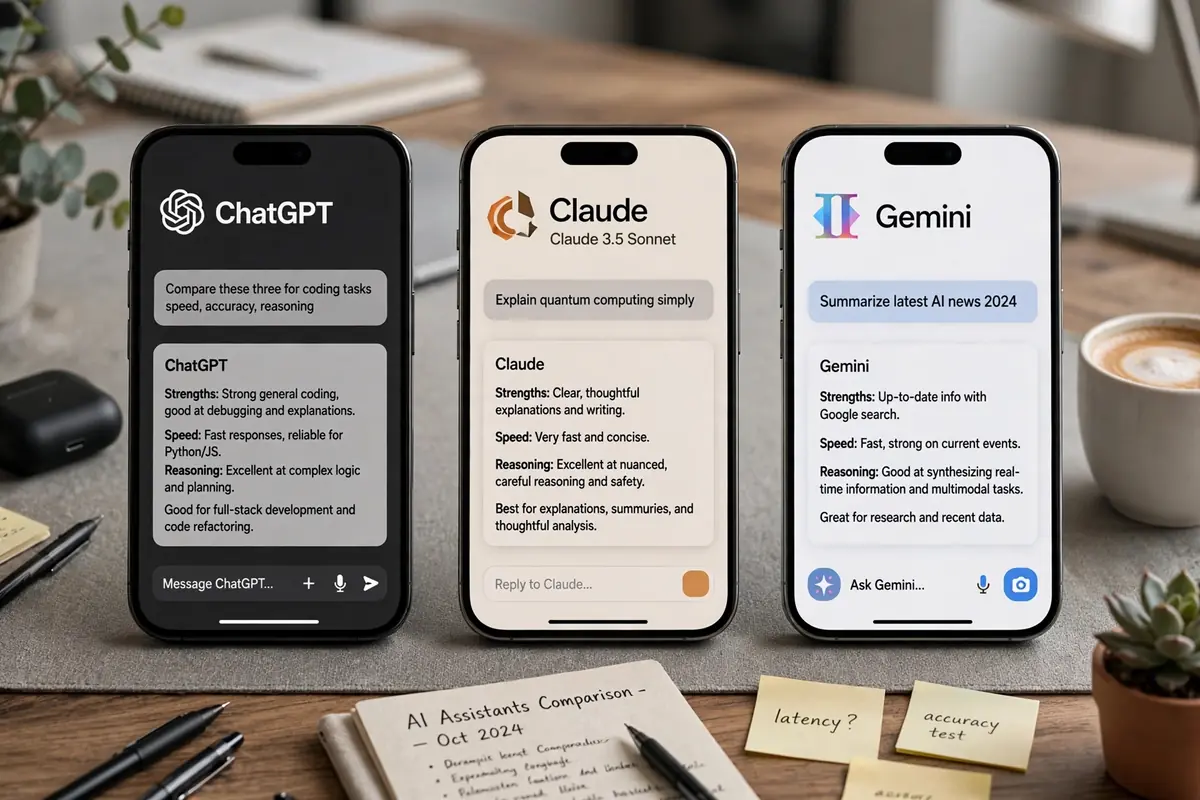
ChatGPT is the best all-rounder for most people, with the broadest mix of writing, research, images, voice, and custom assistants in one place. Claude is the stronger pick for serious writing, long documents, and coding, where its careful and natural output stands out. Gemini is the obvious choice if you live inside Google’s world (Gmail, Drive, Docs, Android), where its deep integration saves you real time every single day.
Table of Contents
- Which AI assistant is best overall?
- ChatGPT vs Claude vs Gemini: head-to-head by task
- Writing quality
- Coding help
- Research and web search
- Images and multimodal features
- Long documents
- Voice and mobile use
- How much does each one cost?
- Which assistant fits your workflow?
- Privacy and data controls compared
- The 60-second decision quiz
- 5 common mistakes people make when choosing
- Who should avoid each assistant?
- How to get better answers from whichever you pick
- Conclusion
- FAQ
Which AI assistant is best overall?
ChatGPT wins the overall crown for most users. It covers the widest range of tasks at a high level: writing, coding, web research, image generation, voice conversation, file analysis, and custom assistants you can build for repeated jobs. If you only want to learn one tool, learn this one.
That does not make it the best at everything. Claude consistently produces more natural long-form writing and is a favorite among developers for code review and debugging. Gemini’s edge is different: if your email, files, calendar, and docs already live at Google, it works inside those tools instead of making you copy and paste between apps.
Think of it this way. ChatGPT is the Swiss Army knife. Claude is the chef’s knife. Gemini is the knife that is already in your kitchen drawer.
ChatGPT vs Claude vs Gemini: head-to-head by task
Writing quality
Claude takes this category. Its drafts sound more human, with better rhythm and fewer of the stiff, hedging phrases AI writing is known for. Blog posts, emails, reports, and scripts usually need less editing when they come from Claude.
ChatGPT is a close second and more versatile: it handles short punchy copy, social posts, and structured outlines very well. Gemini writes clearly but can feel plainer, and it sometimes needs an extra round of edits for tone.
Winner: Claude. Runner-up: ChatGPT.
Coding help
Claude is the developer favorite here too. It is strong at reading large codebases, explaining bugs, and suggesting clean refactors. Many programmers keep it open next to their editor all day.
ChatGPT is excellent for learning to code, generating starter projects, and explaining errors in plain language. It also connects to coding agents and tools more broadly. Gemini handles everyday scripting and code explanation fine, but trails the other two on complex debugging.
Winner: Claude. Runner-up: ChatGPT.
Research and web search
This one is close. ChatGPT’s web browsing and deep research features dig through many sources and return cited summaries. Claude also browses and researches with citations, and its summaries tend to be tighter.
Gemini has a secret weapon: it is built by the search company. For questions tied to recent events, local information, or anything already in your Google Drive and Gmail, it often finds the answer fastest.
Winner: tie between ChatGPT and Gemini, depending on the question. If the answer lives in your Google files, Gemini wins easily.
Images and multimodal features
ChatGPT leads clearly. Native image generation, image editing from a text prompt, and strong photo analysis are all built in. You can upload a picture of a broken appliance and get troubleshooting steps, or generate a thumbnail for a video.
Gemini is strong here as well, especially with Google’s wider media tools on paid plans. Claude is the odd one out: it reads images well but image generation was never its focus, so creators usually pair it with another tool.
Winner: ChatGPT. Runner-up: Gemini.
Long documents
Got a 100-page PDF to summarize? Gemini’s huge context window (up to a million tokens on paid plans, as of late 2026) can swallow entire books and long report collections in one go.
Claude is arguably better at *working* with long documents: summarizing accurately, comparing sections, and keeping track of details across chapters. ChatGPT handles long files well too, but with tighter practical limits on the standard plans.
Winner: Gemini for sheer size, Claude for careful document work.
Voice and mobile use
ChatGPT’s voice mode is the most natural of the three and genuinely useful for brainstorming out loud, practicing a presentation, or learning a language. Its mobile app is polished.
Gemini has a natural home on Android, where it can act as the default assistant and reach into your apps. Claude’s voice and mobile experience is fine but basic compared to the other two.
Winner: ChatGPT overall, Gemini on Android phones.

How much does each one cost?
All three offer free tiers with daily limits, which is enough to test them properly before spending anything. Paid plans change often, so treat the official pricing page as the final word, but here is the general shape as of late 2026:
- ChatGPT: free tier, then paid tiers starting around $20/month (Plus), with higher tiers for heavy users. Paid plans raise usage limits and open up the newest models and features.
- Claude: free tier, then Pro around $20/month, with a more expensive Max tier for professionals who hit limits constantly.
- Gemini: free tier, then Google AI plans (Plus, Pro, Ultra) with larger context windows and deeper Workspace integration at the higher levels. Sometimes bundled with Google One storage plans.
Do not pick based on price alone. Twenty dollars a month is cheap if the tool saves you five hours, and expensive if you open it twice a week. Use the free tier for two weeks of real tasks first, then decide.
Which assistant fits your workflow?
This is the question most comparisons skip, and it matters more than benchmark scores.
Pick Gemini if your work already runs on Gmail, Google Docs, Google Drive, Google Sheets, or Android. It can summarize an email thread, pull numbers from a Sheet, and draft a Doc without you uploading or copying anything. No other assistant removes that much friction for Google users.
Pick ChatGPT if your tasks jump between writing, images, research, spreadsheets, and little automation projects. Its custom GPTs and Projects let you build reusable helpers (a meeting-notes formatter, a workout planner, a code reviewer) that remember your preferences.
Pick Claude if your day is mostly writing, editing, analysis, or software development. Its Projects and Artifacts features turn it into a focused workspace: drafts you can iterate on, documents you can refine over many rounds, code you can review carefully.
The ecosystem point is simple. The best assistant is the one closest to where your work already happens. If you want sharper results from any of them, our AI prompt generator builds stronger prompts in seconds, which lifts output quality on all three platforms.
Privacy and data controls compared
All three companies train models on user data by default in some form, and all three let you opt out or limit it. The details differ, so here is what to check:
- ChatGPT: offers temporary chats that are not saved, plus settings to stop your conversations being used for training. Business and enterprise tiers add stronger data protections.
- Claude: Anthropic has positioned itself as the safety-focused lab. Consumer settings include controls over training use, and its commercial terms are strict about not training on business data without permission.
- Gemini: tied to your Google account, which is convenient and also worth thinking about. Google offers activity controls and auto-delete settings, but you are handing one company your email, files, search, and AI chats together.
Practical rule: never paste passwords, private client data, medical details, or unreleased business plans into any AI chatbot unless you have checked the data controls and, for work use, have an approved business tier. This applies equally to all three.
The 60-second decision quiz
Answer these five questions honestly:
- Is most of your work inside Gmail, Docs, Drive, or Android? Yes: Gemini.
- Is writing or coding more than half your AI use? Yes: Claude.
- Do you want images, voice, and custom assistants too? Yes: ChatGPT.
- Do you mainly need quick answers and everyday help? Any of the three on the free tier will do.
- Still torn? Start with ChatGPT free for two weeks. It is the easiest to evaluate because it does a bit of everything.
Most power users end up with two: usually ChatGPT plus whichever specialist fits their work. That is normal, not indecisive.
5 common mistakes people make when choosing
1. Chasing benchmark scores. A model that scores 2% higher on a reasoning test will not write your newsletter better. Pick for your tasks, not the leaderboard.
2. Testing with toy prompts. Asking “write a poem about coffee” tells you nothing. Test with your actual work: your real document, your real bug, your real inbox.
3. Ignoring the free tier. All three free plans are generous enough for a real two-week trial. Paying before testing is how people end up with subscriptions they never open.
4. Forgetting the ecosystem. An assistant that lives inside your existing apps beats a slightly smarter one that makes you copy and paste all day.
5. Expecting one winner forever. These tools improve every few months. Revisit your choice once or twice a year instead of treating it as permanent.
Who should avoid each assistant?
Avoid ChatGPT if you only need careful long-form writing or deep code review and nothing else. You would be paying for image tools, voice, and features you never touch. Claude would serve you better for less distraction.
Avoid Claude if you need image generation, a strong mobile voice assistant, or the widest third-party integrations. Its focused approach becomes a limitation when your tasks are scattered.
Avoid Gemini if you do not use Google services. Without Gmail, Drive, and Docs in the picture, its main advantage disappears, and the other two offer more as standalone assistants.
Avoid all three (for now) if your work involves highly regulated data like patient health records or client financial details, unless your employer has approved a specific business tier with proper data agreements.

How to get better answers from whichever you pick
The assistant matters less than how you prompt it. Five habits that improve results everywhere:
- Give context first. “I run a small bakery” beats a bare question every time.
- Show an example. Paste a paragraph you like and say “match this tone.”
- Ask for structure. “Give me three options with pros and cons” beats “what should I do?”
- Iterate. The first answer is a draft. Say what to change instead of starting over.
- Set the format. Word count, bullet points, reading level: state it upfront.
Developers comparing models for building apps should also read our GPT-6 developer guide for a deeper look at working with frontier models in code.
Conclusion
The chatgpt vs claude vs gemini debate has no single winner, and that is good news. It means you can choose based on your actual work instead of hype.
- Most people: start with ChatGPT. It does the most things well.
- Writers, analysts, developers: try Claude. Its careful output is worth the switch.
- Google power users: pick Gemini. The integration is the feature.
Use the free tiers for two real weeks, run the quiz above, and check current pricing before you subscribe. Whichever you choose, better prompting will improve your results more than switching assistants ever will.
FAQ
Which AI assistant is best overall in 2026?
ChatGPT is the best all-rounder for most people, with the widest mix of writing, research, images, voice, and custom assistants. Claude wins for writing quality and coding, while Gemini wins for anyone deeply invested in Google’s ecosystem.
Is Claude better than ChatGPT?
For writing and coding, yes, Claude is generally better. Its drafts sound more natural and need less editing, and developers praise its careful code review. For images, voice, and all-round versatility, ChatGPT is stronger.
Is Gemini better than ChatGPT?
Gemini is better than ChatGPT specifically for Google Workspace users, since it works directly inside Gmail, Docs, Drive, and Sheets. As a standalone assistant for mixed tasks, ChatGPT still has the broader feature set.
Which AI assistant is best for coding?
Claude is the top pick for most developers thanks to its strong code reading, debugging, and refactoring help. ChatGPT is excellent for learning to code and generating starter projects.
Which AI assistant is best for writing?
Claude produces the most natural long-form writing with the least editing needed. ChatGPT is a close second and better for short punchy copy and marketing content.
Which AI assistant is free to use?
All three offer free tiers: ChatGPT, Claude, and Gemini each have a free plan with daily usage limits. The free plans are enough to test properly before paying.
How much do ChatGPT, Claude, and Gemini cost?
Paid plans generally start around $20/month for ChatGPT Plus and Claude Pro, with higher tiers for heavy users. Gemini uses Google AI plans with several levels. Prices and limits change often, so check the official pricing pages before subscribing.
Which AI assistant is best for students?
ChatGPT is the best starting point for students because it handles essays, math explanations, research summaries, and study plans in one place. Gemini is a strong alternative for students who already use Google Docs and Drive for schoolwork.
Can I use more than one AI assistant?
Yes, and many power users do. A common setup is ChatGPT for everyday tasks plus Claude for serious writing or coding, or Gemini for anything inside Google Workspace. The free tiers make this easy.
Which AI assistant is most private?
All three offer data controls, including options to limit training on your chats and temporary conversations that are not saved. Claude’s maker Anthropic emphasizes safety, while Gemini ties into your Google account activity controls. Never paste sensitive personal or client data into any chatbot without checking its data settings first.






3 Comments