AI Review Management Tools for Small Business Guide
You fix cars, cut hair, fill teeth, or serve food. You do not have time to watch Google, Facebook, and Yelp all day. Yet one harsh review can sit unanswered for weeks while new buyers read it and pick your rival. That is the gap ai review management tools for small business close: they watch, ask, and draft for you, so your good work shows up online.
The best ai review management tools for small business collect reviews from Google, Facebook, and Yelp in one inbox, send automatic review requests by text or email, and draft replies in your voice for you to approve before they go live, so you save hours each week and earn more five star reviews without extra staff.
In this guide you will learn what these tools do, which ones fit a small shop, what they cost, how to set one up in a week, and which mistakes can get your profile in trouble.
Table of Contents
- What Are AI Review Tools?
- Why Reviews Decide Who Gets the Call
- The Best Tools Compared
- How AI Writes a Reply (and Where You Step In)
- What to Look For Before You Pay
- How Much Do These Tools Cost?
- Set It Up in One Week
- How to Handle a Negative Review
- Mistakes That Can Hurt Your Profile
- Who Should Skip a Paid Tool for Now
- Pick One in 10 Minutes
- Start Free Before You Pay
- Conclusion
- FAQ

What Are AI Review Tools?
In simple words, ai review management tools for small business are software that pulls your reviews into one place and helps you act on them fast. Think of it as one inbox for every site where buyers talk about you.
Here is what most of them do:
- Watch Google, Facebook, Yelp, and other sites for new reviews, and ping you at once.
- Send review requests by text or email right after a sale or a job ends.
- Draft a reply in your tone. You read it, fix it if you must, then post it.
- Spot trends in what buyers praise or complain about, such as slow service or a star staff member.
- Show your best reviews on your website with a widget, which is a small block that displays reviews on a page.
AI here means software that reads text and writes a draft from it. It does not know your firm unless you feed it facts: your services, your town, your tone, and names you want used. Good setup makes replies sound like you. Bad setup makes every reply sound like a robot, and buyers can tell.
Why Reviews Decide Who Gets the Call
Buyers check reviews before they call. BrightLocal's 2026 survey work, as reported across review guides, puts the share of consumers who read reviews for local firms at about 97%. About 74% pay attention only to reviews from the last 3 months, so an old pile of praise does not carry you for long. You need fresh reviews, and you need replies.
Replies matter for two reasons. First, buyers judge you by how you treat unhappy people, not just happy ones. Second, a steady flow of new reviews and replies helps your local search rank, because Google sees an active, trusted profile. One guide cites BrightLocal's finding that 89% of consumers read business replies to reviews. That means your reply is marketing, read by the next buyer, not just the one who wrote the review.
A small math check helps. If 100 people view your profile and a clear, kind reply thread wins over just 5 more of them, that is 5 extra jobs a month from work you already did. A tool that costs $75 to $99 a month pays for itself if it brings in one or two of those jobs.
The Best Tools Compared
No single pick wins for every shop, so compare ai review management tools for small business by site count, buyer channel, and budget. Prices below come from guides checked in October 2026 and can shift, so check the vendor page before you buy.
- NiceJob, from $75 a month. Best for one-location service firms. Fast setup, automatic text and email review requests, and campaigns that run from day one. Weak spot: thin multi-location reports.
- Murmur, $99 a month. Best for a one-location shop that lives on Google reviews. Setup takes under 10 minutes in its own guide, with a 14-day free trial and no card needed. You pick a tone, and it drafts replies you can auto-post or approve first. Weak spots: Google-first, with Yelp still in progress, and no text messaging inbox.
- EmbedSocial, from $29 a month for Pro. Best if you want cheap review display on your website plus an AI reply helper. Good budget start, but it is lighter on full review request automation than NiceJob.
- BrightLocal, from $39 to $41 a month for Track. Best if you also want local search rank tracking and citation checks next to reviews. A citation is a mention of your firm name, address, and phone on another site. Good value for a local SEO minded owner.
- Grade.us, about $99 a month for one location, or $54 to $110 per seat in agency plans. Best for agencies that run reviews for many clients, with white-label reports, which means reports that carry the agency brand, not the tool brand.
- Broadly, about $110 to $299 a month depending on the plan cited. Best for trades such as HVAC, plumbing, and roofing. It ties review requests to job completion and links with field service tools such as ServiceTitan and Jobber.
- Birdeye, about $299 a month per location. Best for firms with many sites. It watches 200+ sites, runs AI replies, listings, and messaging in one place, and gives deep reports. Weak spots for a small shop: price, a sales call to start, and features you may never open.
- Podium, from about $399 a month for Core. Best if text messaging already runs your firm. Strong text review requests and two-way texting, plus payments add-ons. Weak spots: the highest price here, and AI replies that guides call basic next to Birdeye and Murmur.
- Yext, from $199 a month for Emerging, with other guides citing $450+ a month. Best for large franchise brands that need listings kept in sync across 200+ directories. For one shop, it is too much tool at too high a price.
- ReviewFlowz, from $49 a month for Solo. Best for a solo owner who wants automatic AI replies at a low price. Check its site coverage before you buy, since it is smaller than Birdeye or Podium.
For a deeper look at picking software on a budget, read how to choose tools for a small firm. For a related AI pick, see AI meeting helpers for small teams.
How AI Writes a Reply (and Where You Step In)
A good reply has three parts: name what the buyer said, show you care, and point to a next step. AI can draft all three in seconds if you give it good inputs.
Try this test on any tool. Feed it five old 5-star reviews and read the five drafts. If all five sound the same, the tool is weak. Good tools mirror details: the service named, the staff member praised, the town, and your tone. A cafe reply sounds warm and short. A law firm reply sounds calm and formal. Same tool, different voice, because you set the voice.
Use this rule for posting:
- 4-star and 5-star reviews: you may auto-post after a short delay, once you trust the drafts.
- 3-star reviews: read first. These are mixed, and a wrong tone can push the buyer away.
- 1-star and 2-star reviews: a human must read and edit before posting, every time. No exceptions.
AI is fast at words and weak at judgment. It cannot know that a refund was already given, or that a staff member was sick that day. You add the fact. AI adds the polish. That split keeps replies fast and safe.
What to Look For Before You Pay
Before you pay for ai review management tools for small business, check these six points. They matter more than a long feature list.
- Google first. Google carries most reviews, so any tool you pick must cover Google Business Profile well. Yelp, Facebook, and TripAdvisor come next, based on your trade.
- Request timing. The best tools send a request within 2 hours of a job or sale, when the buyer is happiest. Next-day requests get fewer replies.
- Approval control. You want a choice: auto-post, approve first, or a mix by star rating. Avoid tools that force full auto-post with no queue.
- Real setup time. Ask for a trial and try to post a reply to a real review in the first 20 minutes. If you cannot, the tool will slow you down each week.
- Contract terms. Month to month beats a yearly lock-in for a first tool. Check cancel terms and whether the price jumps after an intro rate.
- Support that answers. A tool you cannot set up is a tool you will not use. Check help docs and chat hours before you pay.
One more check: ask how the tool treats negative reviews in its workflow. The honest answer is that it drafts a reply and alerts you fast. Any tool that promises to hide, filter, or bury bad reviews is a red flag. The rules section below explains why.
How Much Do These Tools Cost?
Prices for ai review management tools for small business split into three bands, and the band should match your size.
- Budget, $29 to $99 a month. EmbedSocial, BrightLocal Track, ReviewFlowz, NiceJob at $75, and Murmur at $99. This band fits one location and under 50 reviews a month.
- Mid, about $99 to $199 a month. Grade.us for one location, Broadly on some plans, and bundles that add messaging or marketing. This band fits a busy shop or a small team.
- High, $299 to $450+ a month per location. Birdeye, Podium, and Yext. This band fits multi-location firms, franchises, and firms where text messaging is the core workflow.
Watch for costs past the headline price. Some tools charge per location, per seat, or per text batch. Some charge extra for AI replies, white-label reports, or review display widgets. Ask for the full monthly total for your exact setup, in writing, before you sign.
A cheap way to judge value: divide the monthly price by the extra reviews you gain. If a $75 tool brings 10 extra reviews a month, each costs $7.50. If one of those reviews brings a $200 job, the math is easy. Track it for 90 days, then decide to keep, switch, or drop the tool.
Set It Up in One Week
You do not need a month to launch. Follow this plan.
- Day 1: Connect. Link Google Business Profile first, then Facebook and Yelp. Check that past reviews flow into the inbox.
- Day 2: Set voice. Write a short tone guide: warm or formal, short sentences, your firm name, your town, and words you never use. Add three of your best past replies as examples.
- Day 3: Set rules. Auto-post 5-star replies after a delay, approve 3-star replies, and hold all 1-star and 2-star replies for a human. Turn on instant alerts for low ratings.
- Day 4: Set requests. Link the request trigger to a sale, booking, or job close. Send by text where buyers use phones, and by email where they use inboxes. Keep the message short with one link.
- Day 5: Test. Send a request to yourself and a staff member. Reply to a real old review with an AI draft, edit it, and post it. Fix any tone issue now.
- Day 6: Train the team. Show staff who checks alerts, who replies, and how fast. Low ratings get a reply within one business day.
- Day 7: Review the week. Count requests sent, reviews gained, and replies posted. Fix the weakest step, then repeat.
If setup drags past a week, cut scope. Launch with Google only, one request channel, and one reply rule. Add sites and channels later, once the habit sticks.
How to Handle a Negative Review
A bad review feels personal, but buyers read your reply more than the complaint. Use this four-step reply shape.
- Name the exact issue. "You waited 40 minutes past your slot" beats "Sorry for your experience." Specific words show you read it.
- Own what is yours. If the fault was real, say so in plain words. Do not argue, blame, or share private details.
- State one fix. Name what you changed or what you will do, such as a new booking gap or a callback from a named manager.
- Move it offline. Give a real name, phone, or email and invite a direct chat. Do not settle facts in public.
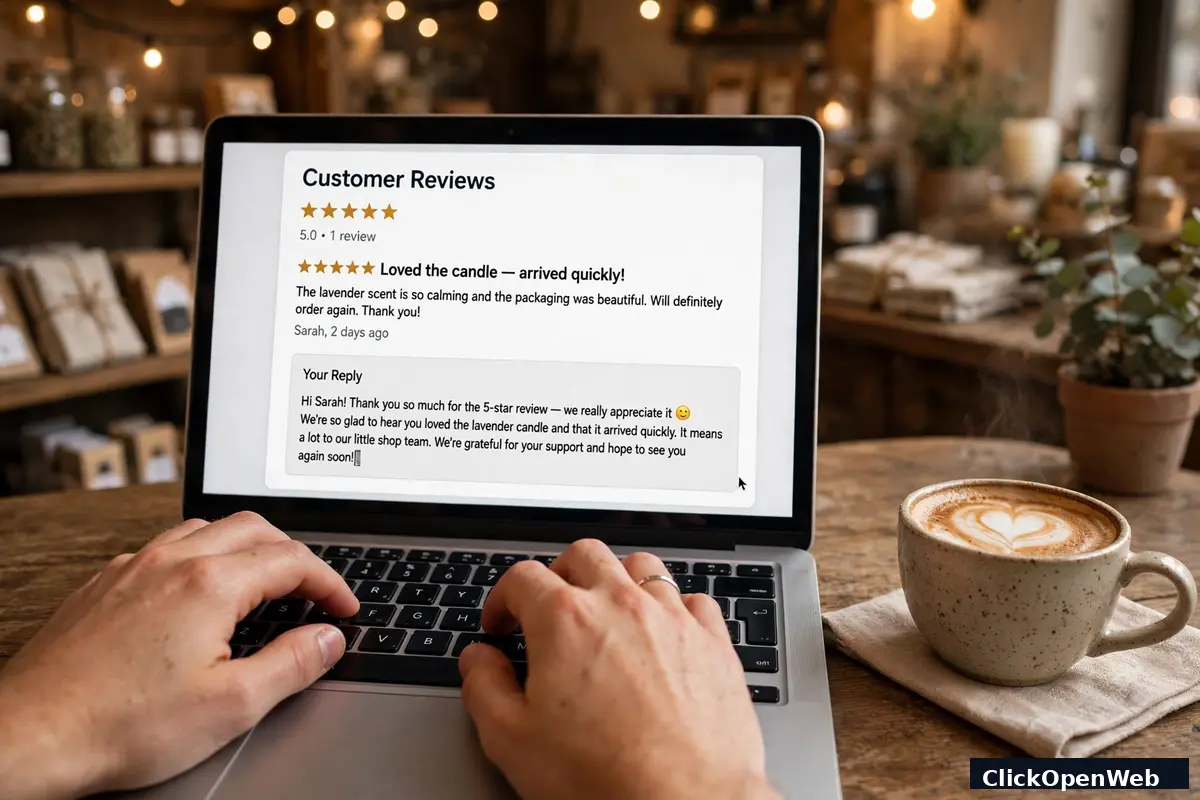
Here is a short example you can adapt. "Thanks for telling us, Sara. You waited too long on Tuesday, and that is on us. We added a buffer between bookings so this does not repeat. Please call me, Ana, at our shop number and I will make it right." Short, human, and closed with a next step.
Never post a reply when you are angry. Draft it, wait an hour, then read it as a new buyer would. If it sounds cold, proud, or defensive, rewrite it. One calm reply can win more buyers than ten perfect 5-star reviews.
Mistakes That Can Hurt Your Profile
These errors with ai review management tools for small business cost firms real money and search rank. Avoid all of them.
- Review gating. This means asking buyers how happy they are first, then sending only happy ones to Google and hiding unhappy ones in a private form. Google bans this as fake engagement, and the FTC's 2024 consumer review rule bans suppressing negative reviews. Ask every buyer, the same way.
- Paying or bribing for reviews. Google bans incentives for any review, even a discount, free item, or gift card. The FTC bans incentives tied to praise. Never offer a reward for a review or for changing one.
- Fake reviews. Do not write your own reviews, ask staff or family to post them, or buy reviews. Google checks account history and patterns, and fake reviews get removed. Worse, they can trigger profile trouble.
- Staff quotas and scripted praise. Do not set a review count target for staff, and do not ask buyers to name a staff member or use set words. Google lists both as manipulation signals.
- Copy-paste replies. Buyers spot the same "Thanks for your feedback!" on every review. It reads as careless, and it wastes the trust a reply should build.
- Ignoring old reviews. A profile with no replies for months looks closed, even if the firm is open. Reply to new reviews first, then work back through old ones in small batches.
When in doubt, pick the open path: ask all buyers, reply in public, and fix the real issue behind a bad review. That path is slower, but it is the only one that holds up under Google rules and buyer trust.
Who Should Skip a Paid Tool for Now
A paid tool is not right for every firm yet. Skip it for now if any of these fit you.
- You get under 5 reviews a month. Free Google alerts and manual replies will cover you.
- No one on your team can check replies at least twice a week. A tool that piles up unanswered reviews helps no one.
- You run a brand-new firm with under 10 reviews total. Spend first on asking every buyer in person and by text, using free links.
- You need listings help, not review help. A listings tool or a local SEO check may fit better than a review platform.
If you skip a paid tool, still do the basics: claim Google Business Profile, turn on review alerts, reply within a day or two, and ask every buyer with one short link. That free habit builds the review base a paid tool will later grow.
Pick One in 10 Minutes
Answer these four questions about ai review management tools for small business, then pick the match.
- How many sites do you run? One site points to NiceJob or Murmur. Many sites point to Birdeye.
- Where do your buyers live online? Google-first firms fit Murmur. Text-first firms fit Podium. Trade firms with job software fit Broadly.
- What is your monthly budget? Under $100 points to NiceJob, Murmur, EmbedSocial, or BrightLocal. Over $250 opens Birdeye and Podium.
- Who will check replies? Just you points to a simple tool with approval control. A team points to a tool with roles and alerts.
If you still cannot pick, start a free trial with NiceJob or Murmur, run the 20-minute reply test from the earlier section, and keep the one that feels easy on day one. The tool you use beats the tool with the longest feature list. For more small-firm software picks, see AI helpers for small business owners.
Start Free Before You Pay
You can build a solid start with no monthly fee. Use Google Business Profile for free alerts and replies, and use its built-in review link or QR code at checkout and in emails. Add a free reply draft tool, such as a free tier reply generator, to speed up wording, then edit every draft in your own voice.
Track it all in a simple sheet: buyer name, date asked, site, stars, and reply date. After 90 days, count your review growth. If you pass 20 reviews and replies eat more than 2 hours a month, a paid tool starts to make sense. If you stay under that line, keep the free stack and spend the saved money on service, not software.
Conclusion
Reviews are now the front door of a small firm. Buyers read them, judge your replies, and pick based on what they see. The right tool does not replace you. It gives you one inbox, faster requests, and drafts that sound like you, so good service turns into public proof.
Start small: pick one tool that fits your budget, set a clear approval rule, and ask every buyer. In 90 days, check your review count, your star trend, and your reply speed. If all three moved up, keep the tool. If not, switch to a simpler one. The best ai review management tools for small business are the ones you use each week, not the ones with the most features.
FAQ
What are the best ai review management tools for small business?
For most one-location firms, NiceJob at $75 a month and Murmur at $99 a month are the best starts, because both set up fast and focus on review requests and replies. Birdeye at about $299 a month fits multi-location firms, and Podium at about $399 a month fits text-first firms. Pick by site count, budget, and who checks replies.
What is review management software?
It is software that collects reviews from sites such as Google, Facebook, and Yelp into one inbox, sends review requests by text or email, and helps you draft and post replies. Most tools also track your star average over time and flag new low ratings so you can act fast.
How much does review management software cost?
Budget tools run $29 to $99 a month, mid tools run about $99 to $199 a month, and all-in-one platforms run $299 to $450 or more a month per location. Google Business Profile itself is free but fully manual. Always ask for the full total, since per-location fees, text batches, and add-ons can lift the bill.
Can AI post review replies without my approval?
Yes, most paid platforms allow auto-posting, but the safe setup is to auto-post only 4-star and 5-star replies and hold lower ratings for a human check. Negative reviews carry brand risk, and a wrong tone in public can cost more buyers than the time saved.
Does replying to reviews help my Google ranking?
Replying helps in two ways. It signals an active, trusted profile, which supports local search visibility, and it lifts clicks, because buyers trust a firm that answers. Fresh reviews also matter, since many buyers look only at reviews from the last few months.
Is it against the rules to ask only happy customers for reviews?
Yes. That practice is called review gating, and Google bans it. The FTC rule from October 2024 also bans suppressing negative reviews. Ask every recent buyer in the same way, and let each buyer decide whether to post and what stars to give.
Can a tool delete a bad review?
No. No honest tool can delete a real review. A tool can help you flag a fake review to Google for review, and it can help you earn more good reviews so one bad review weighs less. If a tool promises deletions, walk away.
How long does setup take?
A simple tool takes under a day to connect and a week to run well, using the plan in this guide. Larger platforms with listings, messaging, and CRM links take longer and often need a sales call and onboarding. Test any tool by posting a reply to a real review in the first 20 minutes.
Do I need a tool if I only get a few reviews a month?
Probably not yet. If you get under 5 reviews a month, free Google alerts, manual replies, and a short ask after each sale will cover you. Move to a paid tool when replies start to take more than 2 hours a month or you pass about 20 reviews.
What is the biggest mistake small firms make with reviews?
They ask no one, then panic over one bad review. The fix is steady and simple: ask every buyer, reply fast and kindly, and fix the real issue behind complaints. Firms that do this each week build a review base that survives one bad day.